
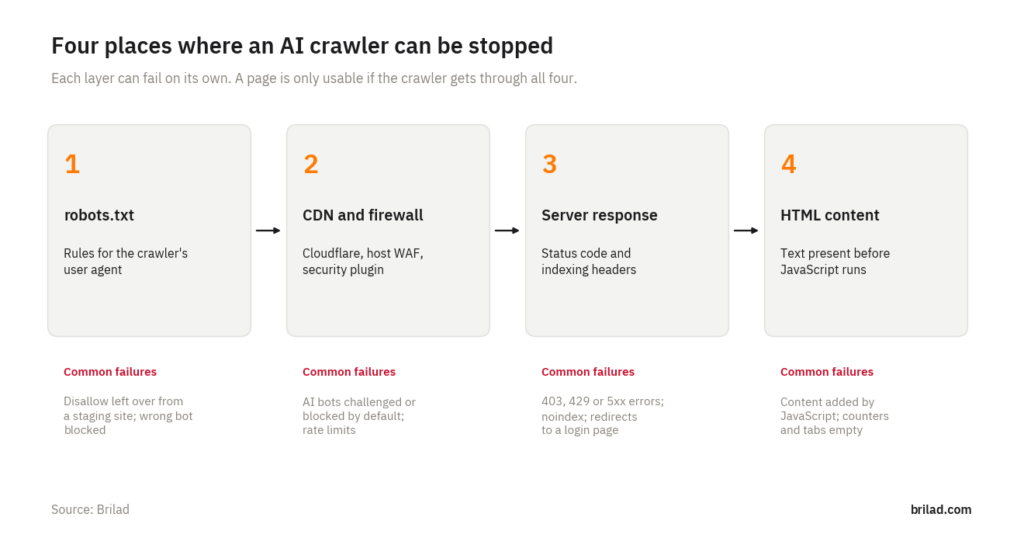
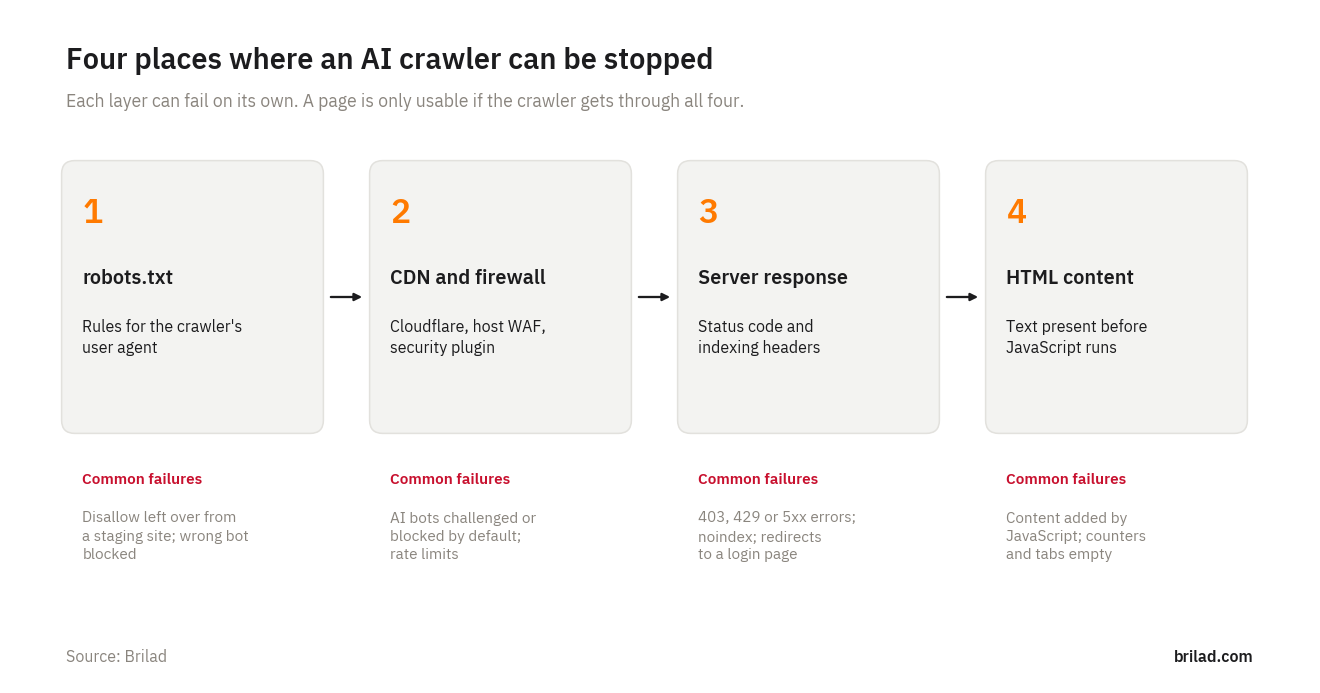
To check whether AI crawlers can access your website, test four layers in order: your robots.txt rules, your CDN or firewall, the server’s response to each crawler, and whether the page’s text is in the HTML before JavaScript runs. A crawler has to get through all four before ChatGPT, Claude, Perplexity or Google’s AI features can use your page. This guide shows how to check each layer by hand and includes a free script that checks all four for ten crawlers in one run.
Why this is worth checking
AI assistants that search the web can only quote pages their crawlers have fetched. If OpenAI’s OAI-SearchBot is blocked, your pages cannot appear in ChatGPT search results. If a firewall shows PerplexityBot a challenge page, Perplexity sees the challenge instead of your content. These problems are easy to create by accident and invisible in a normal browser, because your own visits are never blocked.
How do I know if my robots.txt blocks AI crawlers?
Open https://www.yoursite.com/robots.txt in a browser and look for groups that name AI crawlers or block everything:
| Rule | Effect |
|---|---|
User-agent: * followed by Disallow: / |
Blocks every crawler, including Googlebot. Often left over from a staging site. |
User-agent: GPTBot followed by Disallow: / |
Blocks OpenAI’s training crawler only. ChatGPT search uses OAI-SearchBot, which is not affected. |
User-agent: OAI-SearchBot followed by Disallow: / |
Removes your pages from ChatGPT search results. |
User-agent: Google-Extended followed by Disallow: / |
Stops use of your content for Gemini training and grounding. Google Search and AI Overviews are not affected. |
A crawler follows the most specific group that names it, and falls back to User-agent: * if none does. For Google, the robots.txt report in Search Console shows the file Google last fetched and any parsing errors. Our guide to AI crawlers and robots.txt lists each company’s crawlers and what they are for.
Is my CDN or firewall blocking AI crawlers?
This is the layer most site owners never check. Many firewalls, hosting security rules and WordPress security plugins challenge or block unfamiliar bots. In July 2025 Cloudflare began blocking known AI crawlers by default for new domains, so sites that joined Cloudflare after that date may be blocking AI crawlers without anyone having chosen to.
On Cloudflare, check the bot settings for your domain, including the setting for AI crawlers, and any custom firewall rules that match user agents. If your host runs its own firewall, ask whether rate limits or bot rules apply to crawlers such as GPTBot, ClaudeBot or PerplexityBot. On WordPress, look through security plugins for “block bad bots” or rate-limiting options that list AI crawlers.
From outside, the sign of a firewall block is a different response for a crawler’s user agent than for a browser: a 403 or 429 status, or a short page titled “Just a moment…” instead of your content.
Does the server send the page, and may it be indexed?
Even when nothing blocks the request, the response itself can stop a crawler. Check that key pages return status 200, do not redirect to a login or cookie wall, and do not carry a noindex instruction in a robots meta tag or an X-Robots-Tag header. A noindex left on a template can remove a whole section from search and, as a result, from the AI answers built on it.
Can AI crawlers read the text on my JavaScript site?
Googlebot renders JavaScript. Most AI crawlers do not. In our render test, a React single-page app sent 2 visible words to a crawler, and a Next.js page that fetched its content in the browser sent 3, while the server-rendered version sent all 218. The quick check: open “View page source” (not “Inspect”), press Ctrl+F and search for a sentence from the middle of the page. If it is not there, crawlers that skip JavaScript do not see it either.
The free checker script
We wrote a small Python script that runs these checks for one page in a single command. It needs Python 3.8 or newer and no other packages.
For each of ten crawlers (Googlebot, Bingbot, OAI-SearchBot, ChatGPT-User, GPTBot, Claude-SearchBot, ClaudeBot, PerplexityBot, CCBot and a normal browser as a baseline) it reports:
- whether robots.txt allows the crawler to fetch the page
- the HTTP status and size of the response for that crawler’s user agent
- the number of visible words in the HTML, compared with what a browser receives
- signs of a challenge or block page, and any noindex instruction
It also checks the robots.txt tokens Google-Extended, Applebot-Extended and meta-externalagent, and whether the site has an llms.txt file.
Download the AI crawler access checker (ZIP, 4 KB). The archive contains the script and a short README. It is free to use and share.
How to run it
- Download and unzip the file.
- Open a terminal (Command Prompt on Windows) in the unzipped folder.
- Run
python3 ai_crawler_check.py https://www.yoursite.com/your-page/. On Windows, usepyinstead ofpython3if needed. - Add
--csv results.csvto save the results to a spreadsheet.
What the results look like
We tested the script against three local test servers we set up to reproduce common problems. The first allowed every crawler except GPTBot, and the script reported only that block. The second had two problems at once:
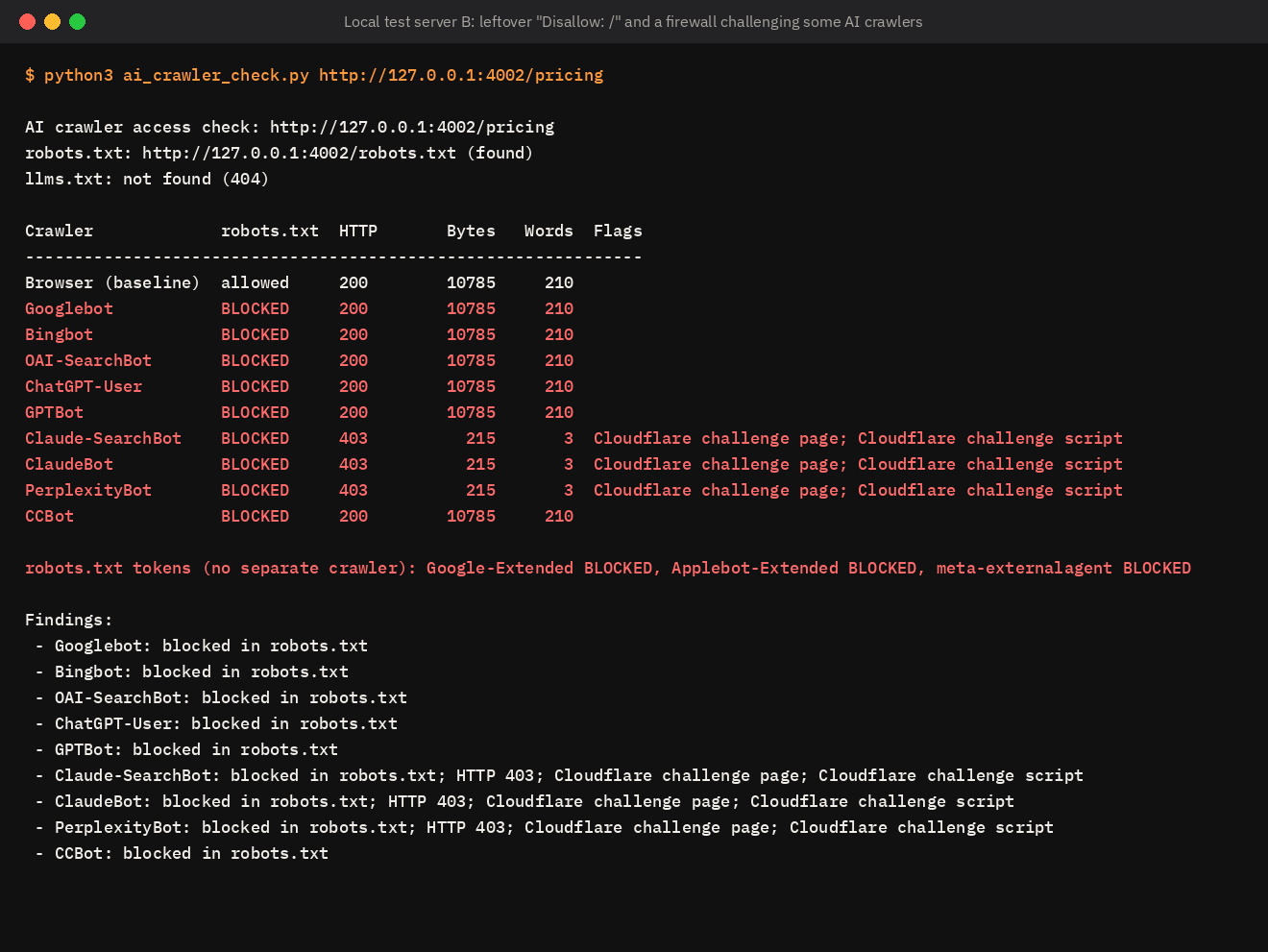
Its robots.txt still contained Disallow: / for all crawlers, which blocks Googlebot and every AI search crawler. On top of that, a firewall rule answered ClaudeBot, Claude-SearchBot and PerplexityBot with a 403 challenge page of 3 words instead of the 210-word page a browser received. Either problem alone would keep the page out of AI answers.
The third was the Next.js page from our render test that loads its content in the browser:
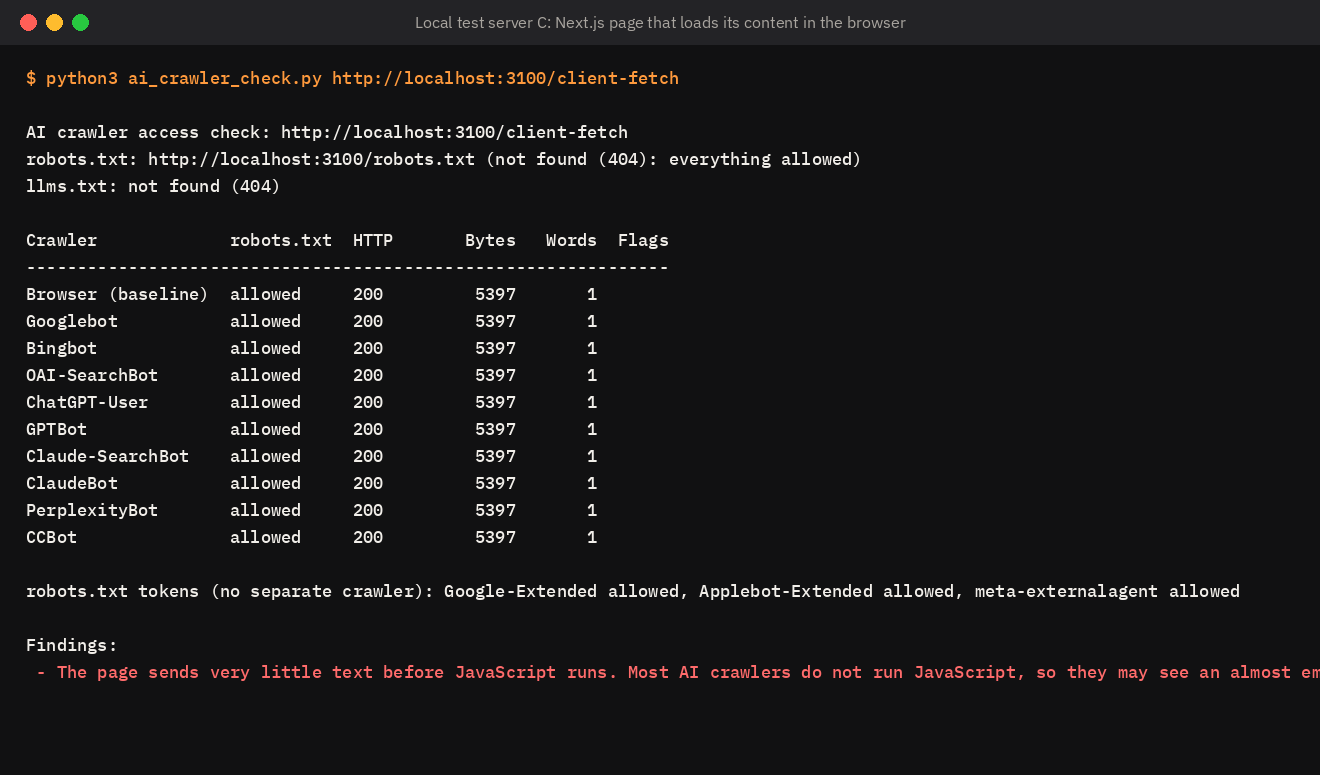
Every crawler was allowed and every request returned status 200, so a basic uptime or robots.txt check would pass. The script still flags it, because the HTML contains a single visible word before JavaScript runs.
Reading the results
| Result | What it means | What to do |
|---|---|---|
| BLOCKED in the robots.txt column | robots.txt asks this crawler not to fetch the page | Remove or narrow the rule if you want that crawler in |
| 403 or 429, or “challenge page” in flags | A firewall, CDN or security plugin is stopping the crawler | Check CDN bot settings and firewall rules |
| “much less text than a browser gets” | The crawler receives a different or reduced page | Look for user-agent rules, then confirm in server logs |
| “very little text before JavaScript runs” | Content is added in the browser | Render key pages on the server or at build time |
| noindex | The page asks not to be indexed | Remove the noindex if the page should appear in search |
How do I confirm real AI crawler visits?
The script sends requests with each crawler’s user agent from your own computer. Firewalls that verify crawlers by IP address may treat these requests differently from the real crawlers, in either direction. For certainty, check your server’s access logs.
- Download the raw access log. On cPanel hosting, this is under “Raw Access”.
- Search it for crawler names, for example
grep -c "OAI-SearchBot" access.log, or open it in a text editor and search. - Look at the status codes next to those lines. A run of 403 or 429 codes confirms a block.
- Check the IP addresses. OpenAI and several other companies publish the IP ranges their crawlers use, and anything outside them is not the real crawler.
If a crawler never appears in your logs at all, it may be blocked before the request reaches your server, which usually points to the CDN.
Limitations of the script
- It checks one URL at a time. Run it on your home page, a service or product page, and an article, since different templates can behave differently.
- Python’s robots.txt parser uses the first matching group in the file, while Google uses the most specific one. For unusual robots.txt files, compare with Google’s robots.txt report.
- It cannot see IP-based rules that only apply to real crawler addresses.
Frequently asked questions
If I block GPTBot, will ChatGPT stop showing my site?
No. GPTBot collects training data. ChatGPT search results depend on OAI-SearchBot, which has its own robots.txt token.
All crawlers are allowed, but ChatGPT still does not mention us. What next?
Crawler access is the first of several conditions. Work through the rest with our checklist for when ChatGPT does not mention your company.
Should I allow every AI crawler?
Allowing the search crawlers (OAI-SearchBot, Claude-SearchBot, PerplexityBot and Googlebot) is what keeps you visible in AI answers. Allowing training crawlers is a separate business decision.
How often should I run this check?
After any change to hosting, CDN, security plugins or site templates, and every few months otherwise. Settings change more often than most teams expect.
Sources
- OpenAI, “Overview of OpenAI crawlers”
- Anthropic, documentation on ClaudeBot, Claude-User and Claude-SearchBot
- Perplexity, “Perplexity crawlers”
- Google Search Central, “How Google interprets the robots.txt specification”
- Cloudflare, announcement on blocking AI crawlers by default, July 2025