
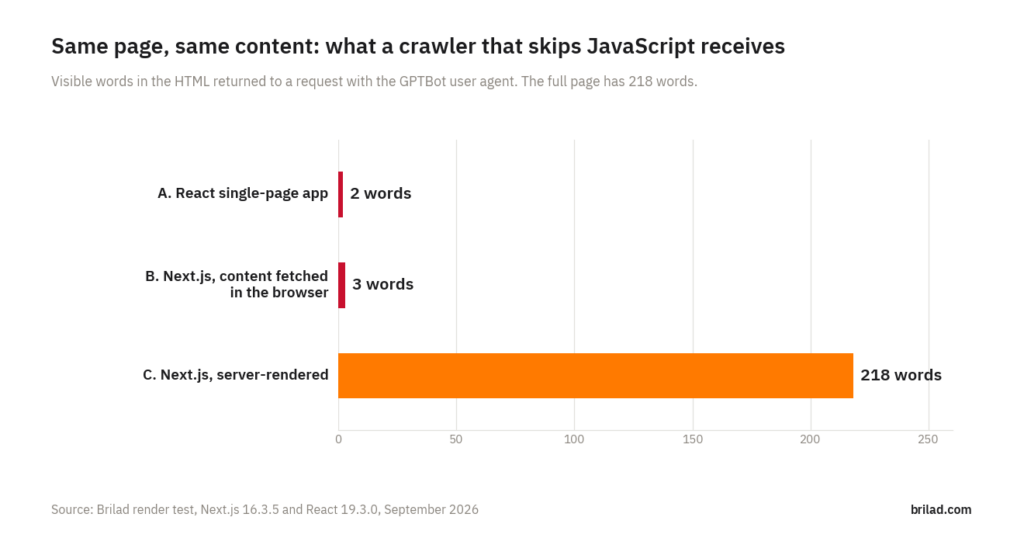
A crawler that does not run JavaScript sees only the HTML your server sends. We built the same web page three ways and requested each one with the user agent of OpenAI’s GPTBot. The React single-page app returned 2 visible words. A Next.js page that loads its content in the browser returned 3: “Render test” and “Loading…”. The server-rendered Next.js page returned all 218 words, the pricing table, the structured data and the meta description. If your site looks like the first two, most AI assistants have little or nothing of yours to quote.
Who this affects
Any site where the main content is added by JavaScript after the page loads. That includes many React, Vue and Angular single-page apps, some sites made with AI app builders that produce React front ends, and Next.js or Nuxt sites where developers fetch content in the browser instead of on the server. Headless CMS setups are a common case: the page shell loads first and the article arrives from an API a moment later.
Visitors never notice, because their browser runs the JavaScript. Crawlers that skip JavaScript receive the empty shell.
Which crawlers run JavaScript
Googlebot renders JavaScript using a current version of Chromium, although Google notes that rendering can happen later than the first crawl. Most AI crawlers behave differently. Vercel’s December 2024 analysis of crawler traffic across its network found that the major AI crawlers it measured, including OpenAI’s and Anthropic’s, downloaded JavaScript files but did not execute them. Google’s crawlers were the exception.
That means a page can rank in Google and still be close to invisible to the systems behind ChatGPT search, Claude and Perplexity.
How we tested
We wrote one page of realistic content: a hosting company’s plans page with an introduction, three question-and-answer sections, a pricing table, two FAQs, three internal links and Product structured data. 218 visible words in total. Then we built it three ways with Next.js 16.3.5 and React 19.3.0:
| Version | How the content reaches the page |
|---|---|
| A. React single-page app | The server sends an empty <div id=”root”>; a 226 KB JavaScript bundle builds the page in the browser |
| B. Next.js, content fetched in the browser | A client component shows “Loading…” and requests the content from a JSON file after the page loads |
| C. Next.js, server-rendered | A server component puts the full content into the HTML before it is sent |
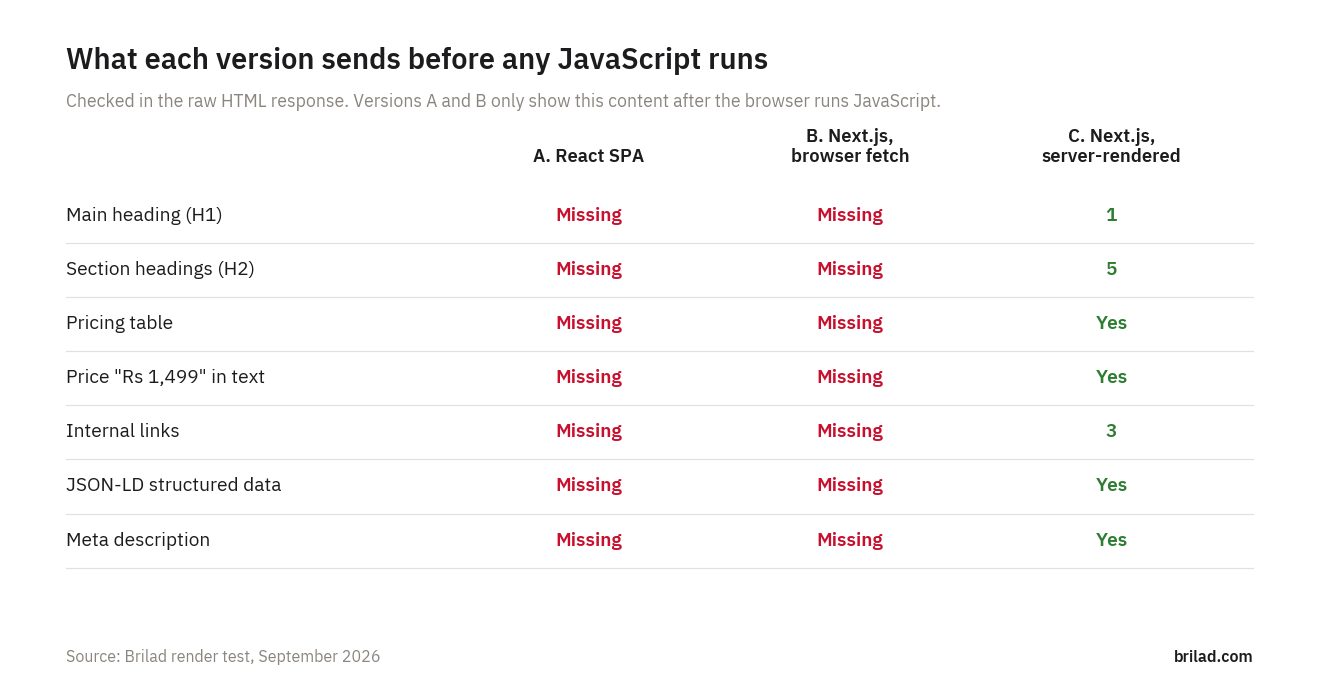
We requested each version with curl, using GPTBot’s user agent string, and checked the raw response: visible words outside script tags, headings, the table, the price text, internal links, JSON-LD and the meta description. The test code is available to download at the end of this article so you can run it yourself.
Results
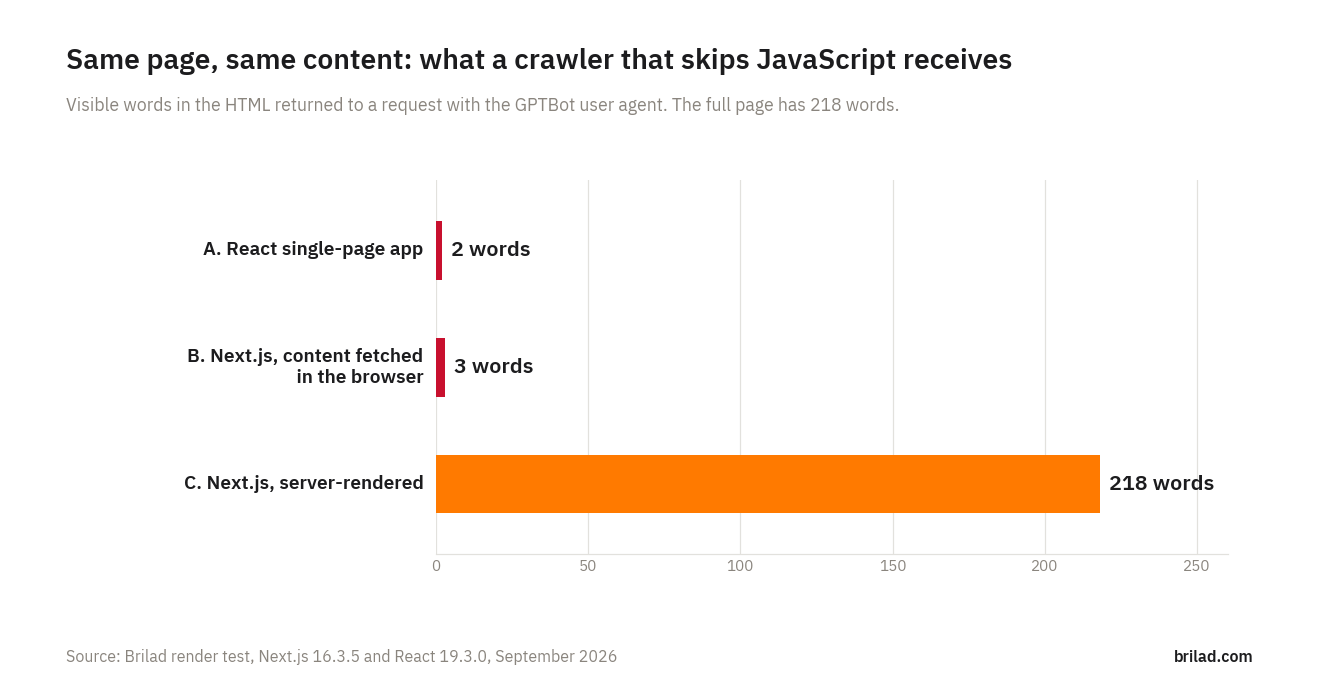
Versions A and B look identical to C in a browser. In the raw HTML they are almost empty.
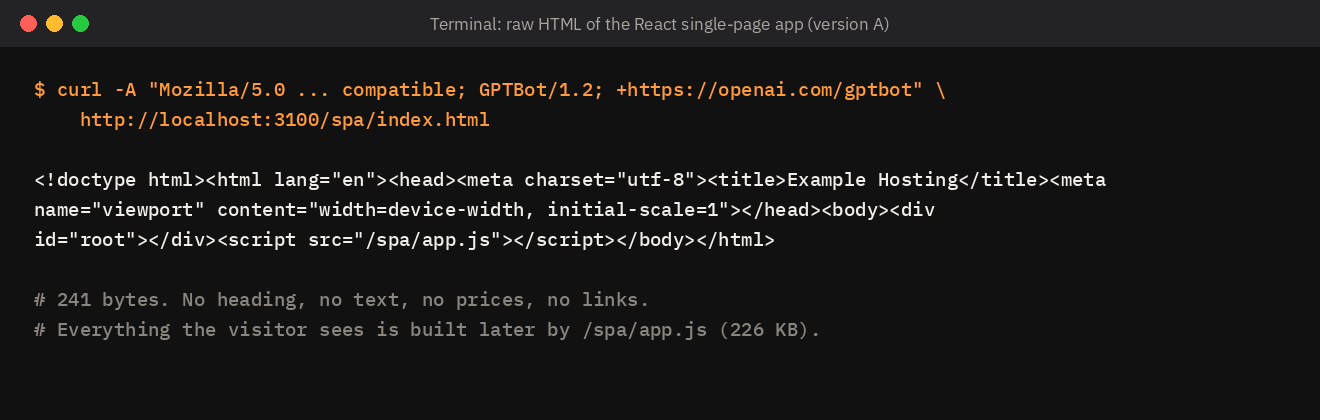
Version B is the more surprising case. It sent 5.4 KB of HTML, more than twenty times the single-page app, but nearly all of it was script references and framework data. The only visible text was the page title and “Loading…”. It also had no meta description. In the Next.js App Router, metadata can only be exported from server components, so a page marked “use client” at the top cannot define its own description. That is an easy mistake to make and hard to spot in a browser.
What this means for AI search
AI assistants that search the web retrieve passages from pages and quote them. If the crawler received no passages, there is nothing to retrieve. A pricing question about version A or B could only be answered from other sites, such as directories, review platforms or competitors, which is how a company ends up described by everyone except itself.
Google is a partial exception because it renders JavaScript, so the same page may appear in Google results and AI Overviews while being absent from ChatGPT or Perplexity answers. Teams that only check Google can miss the problem entirely.
How to check your own site in two minutes
- Open a key page, right-click and choose “View page source” (not “Inspect”, which shows the page after JavaScript has run).
- Press Ctrl+F and search for a sentence from the middle of the main content, and for one of your prices.
- If either is missing, that content is added by JavaScript.
- For a closer look, run this in a terminal and read the output:
curl -A "GPTBot" https://www.yoursite.com/your-page/ - Check Google separately with the URL Inspection tool in Search Console, which shows the HTML Google rendered.
To check robots.txt, firewall responses and rendering for ten crawlers at once, use our free AI crawler access checker.
How to fix it
Next.js
- Keep pages as server components and fetch content on the server. Use “use client” only for the interactive parts, such as a form or a tab switcher, not for the whole page.
- Define titles and descriptions with the metadata export or generateMetadata in server components.
- Use static generation or incremental static regeneration for pages that do not change on every request.
- Output JSON-LD from the server component, as version C does.
React single-page apps
- For a marketing site, move to a framework that renders on the server or at build time, such as Next.js or Astro.
- If a full move is not possible, pre-render the key public pages (home, services, pricing, articles) to static HTML at build time.
Vue, Angular and others
Vue sites can use Nuxt with server rendering, Angular has built-in server-side rendering, and most frameworks now offer a static or server option.
After the fix, repeat the two-minute check. The sentence and the price should appear in the page source.
What this test does not show
- It ran on a local server, not against live crawlers. It shows what a crawler that skips JavaScript would receive, which matches the behaviour Vercel measured, but crawler behaviour can change.
- It does not measure rankings or citations, only what content is available to be ranked or cited.
- Pages that render most content on the server but load some sections in the browser, such as reviews or FAQs in tabs, fall between B and C. Check those sections individually.
Download the test
The full test is available as a small Next.js project: the shared page content, all three versions and the build commands. Download the render test (ZIP, 6 KB). Run npm install, then npx next build and npx next start -p 3100, and request each page with curl as shown above. The README in the archive lists the exact steps.
Frequently asked questions
Does Google have the same problem?
Less so. Googlebot renders JavaScript, though rendering may be delayed. Other search engines and most AI crawlers do not render it.
Is React bad for SEO?
React itself is fine. The issue is where the HTML is produced. React rendered on the server, as in Next.js server components, sends complete HTML.
Our developers say the site is fast. Does that matter here?
Speed and crawlability are separate questions. A fast single-page app can still send empty HTML to crawlers.
Sources
- Vercel, “The rise of the AI crawler”, December 2024
- Google Search Central, “Understand the JavaScript SEO basics”
- Next.js documentation, “Server and Client Components” and “Metadata”
- OpenAI, “Overview of OpenAI crawlers”